


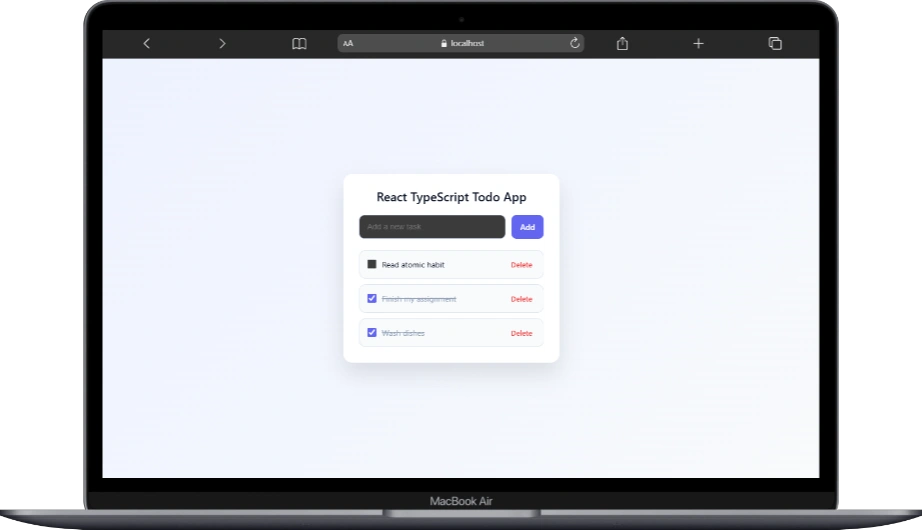
I’ve built more todo lists than I can count.
Some were ugly.
Some were overengineered.
A few actually taught me something.
And if there’s one truth I’ve learned as a developer, it’s this:
a simple Todo List can reveal how you really think as a programmer.
So in this post, we’re not just “building a Todo List.”
We’re building understanding.
Why a Todo List Still Matters
When you’re starting with React, everything feels exciting:
hooks, state, props, components, reusability, performance.
But excitement fades the moment things stop working.
A Todo List forces you to face real problems:
- How do I manage state cleanly?
- When should a component re-render?
- How do I avoid turning one file into spaghetti?
- How do I think in components, not pages?
This is why experienced developers still use it as a teaching tool.
Not because it’s easy but because it’s honest.
Thinking Before Coding
Before writing a single line of code, I asked myself:
What is the smallest version of this app that actually works?
Not:
- authentication
- drag and drop
- fancy animations
Just:
- add a task
- display tasks
- mark them as done
- remove them
That’s it.
Everything else is noise.
At this point, this is where most beginners expect magic.
But what you’ll see instead is something better: clarity.
Here’s the heart of the app — App.tsx.
Not flashy. Not clever. Just honest React.
This file has one responsibility:
own the state and orchestrate the flow.
And that’s exactly what it does.
Defining the Shape of Our Data
Before touching state, we define what a task is:
type Task = {
  id: number;
  text: string;
  completed: boolean;
};
This may look small, but this is a big mindset shift.
Instead of guessing what a task contains later, we lock it in early.
TypeScript becomes a teammate that tells us when we’re about to mess up.
Every todo:
- has a unique identity
- contains readable text
- knows whether it’s done or not
No surprises. No hidden fields.
State Lives Where It Makes Sense
const [tasks, setTasks] = useState<Task[]>([]);
This is the source of truth.
Not in TodoItem.
Not in TodoInput.
Not spread across multiple files.
All tasks live here because this component understands the whole picture.
That’s intentional.
Adding a Task (The Right Way)
const addTask = (text: string) => {
  if (!text.trim()) return;

  const newTask: Task = {
    id: Date.now(),
    text,
    completed: false,
  };

  setTasks([...tasks, newTask]);
};
A few quiet but important decisions happen here:
- We guard against empty input
- We create a new object instead of mutating state
- We let React handle updates predictably
No side effects.
No hacks.
This is code you won’t be afraid to open again.
Deleting Without Breaking Everything
const deleteTask = (id: number) => {
  setTasks(tasks.filter(task => task.id !== id));
};
This is where immutability clicks.
We don’t remove the task.
We create a new list without it.
React loves this.
Your future self will too.
Toggling Completion (Clean & Readable)
const toggleTask = (id: number) => {
  setTasks(tasks.map(task =>
    task.id === id
      ? { ...task, completed: !task.completed }
      : task
  ));
};
No nested conditionals.
No weird flags.
Just:
- find the task
- update what changed
- leave everything else alone
This pattern scales surprisingly far.
The UI Is Just a Reflection of State
<TodoInput onAdd={addTask} />

<div className="task-list">
  {tasks.map(task => (
    <TodoItem
      key={task.id}
      task={task}
      onDelete={deleteTask}
      onToggle={toggleTask}
    />
  ))}
</div>
Notice something important?
App.tsx doesn’t care how the input looks.
It doesn’t care how a task is rendered.
It only cares about what happens.
That separation is not accidental it’s learned.
Why This Structure Works Long-Term
I’ve seen todo apps die because:
- state was duplicated
- logic leaked into UI components
- everything depended on everything else
This structure avoids that.
Each component has a job.
Each function does one thing.
State lives in one place.
It’s boring.
And boring code is usually the code that survives.
What This Teaches You (Quietly)
This file teaches you:
- how to think in data
- how to trust React’s reactivity
- how to avoid premature complexity
- how to structure apps that grow without fear
If you understand this App.tsx,
you’re already thinking like a real React developer.
Breaking Things Down Even Further
Once the main state is stable, this is where experienced developers slow down instead of speeding up. Because this is usually the moment when logic starts leaking everywhere.
That’s why TodoInput and TodoItem exist.
Not because we need more files, but because we want clearer thinking.
import React, { useState } from "react";

interface TodoInputProps {
  onAdd: (task: string) => void;
}

const TodoInput: React.FC<TodoInputProps> = ({ onAdd }) => {
  const [value, setValue] = useState("");

  const handleSubmit = () => {
    if (!value.trim()) return;
    onAdd(value.trim());
    setValue("");
  };

  return (
    <div className="todo-input">
      <input
        type="text"
        placeholder="Add a new task"
        value={value}
        onChange={(e) => setValue(e.target.value)}
        onKeyDown={(e) => e.key === "Enter" && handleSubmit()}
      />
      <button onClick={handleSubmit}>Add</button>
    </div>
  );
};

export default TodoInput;
TodoInput: Keeping State Where It Belongs
TodoInput does exactly one thing: collect text and send it upward.
It doesn’t know what a task looks like.
It doesn’t care how tasks are stored.
It doesn’t even know how many tasks exist.
And that’s the point.
Inside the component, we keep a single piece of local state: the current input value. This is a perfect use case for useState because the data is temporary and tied to the UI.
When the user types, we update the value. When they press Enter or click the button, we validate the input, send the text to the parent using onAdd, and immediately reset the field.
This pattern is powerful because it keeps responsibility tight. The input manages typing. The parent manages data. No overlap. No confusion.
If you’ve ever debugged a form that controlled global state unnecessarily, you’ll appreciate how calm this feels.
Why the Input Doesn’t Add Tasks Itself
This is one of those decisions that separates beginners from developers who’ve been burned before.
TodoInput does not push tasks into a list. It doesn’t mutate state. It doesn’t know anything about IDs or completion flags.
It only reports an event: “Hey, the user submitted this text.”
That’s it.
By doing this, the component becomes reusable, testable, and predictable. You could drop it into another app tomorrow and it would still make sense.
import React from "react";

type Task = {
  id: number;
  text: string;
  completed: boolean;
};

interface TodoItemProps {
  task: Task;
  onDelete: (id: number) => void;
  onToggle: (id: number) => void;
}

const TodoItem: React.FC<TodoItemProps> = ({
  task,
  onDelete,
  onToggle,
}) => {
  return (
    <div className={`todo-item ${task.completed ? "completed" : ""}`}>
      <label className="todo-left">
        <input
          type="checkbox"
          checked={task.completed}
          onChange={() => onToggle(task.id)}
        />
        <span>{task.text}</span>
      </label>

      <button className="delete-btn" onClick={() => onDelete(task.id)}>
        Delete
      </button>
    </div>
  );
};

export default TodoItem;
TodoItem: A Dumb Component on Purpose
TodoItem is intentionally boring.
It receives a task.
It displays a checkbox and text.
It forwards actions back to the parent.
That’s all it does.
There is no internal state here, and that’s a good thing. The moment list items start managing their own truth, bugs creep in quietly and stay forever.
Instead, when a checkbox changes, we call onToggle. When delete is clicked, we call onDelete. The item never decides what happens next. It just reports what happened.
This keeps the flow of data consistent and predictable.
Conditional Rendering Without Mental Gymnastics
The completed state is handled with a simple conditional class. If the task is completed, the class changes. The UI reacts automatically.
No extra booleans.
No duplicated state.
No manual DOM manipulation.
This is React doing exactly what it was designed to do.
Why This Structure Scales Better Than You Think
At first glance, this might feel like “extra work” for a small app. But this structure pays off fast.
You can add filtering without rewriting logic.
You can add persistence without touching UI components.
You can add animations without breaking state flow.
Most importantly, you can come back to this code weeks later and still understand it.
That’s the real win.
The Quiet Lesson Behind This Todo List
This app isn’t teaching you how to build a todo list.
It’s teaching you how to:
think in components
separate concerns naturally
trust data flow
write code that doesn’t fight you later
Frameworks change. Libraries come and go. But this way of thinking sticks.
And it starts with small, boring, well-structured components like these.
To run the app just follow the instruction inside the downloaded file. Thanks!
No responses yet