


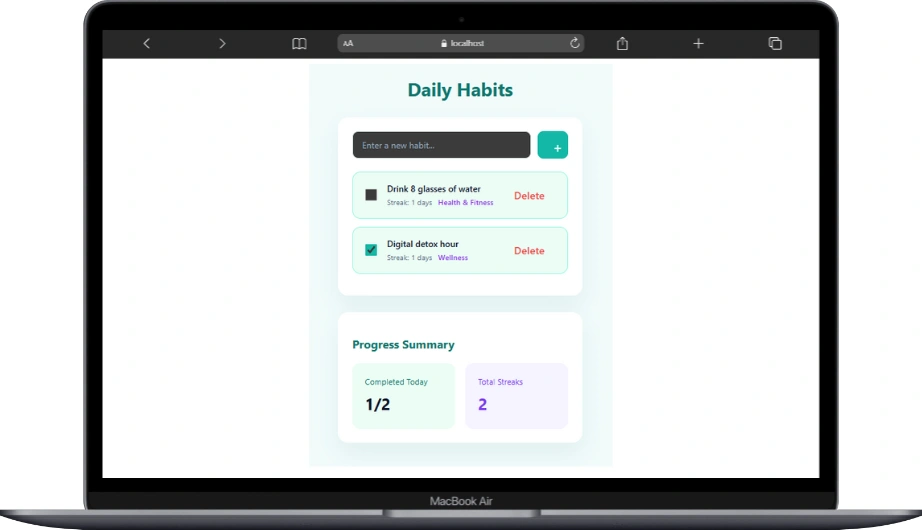
Habit trackers sound simple until you actually try to build one.
I’ve made versions that were too motivational, too strict, or so complicated they felt like punishment instead of progress. Somewhere along the way, I learned that a good habit tracker should feel calm. Quiet. Almost boring.
This one is exactly that.
The idea is simple: track habits, mark them as done, keep a streak, and get a small sense of progress without being yelled at by the UI.
That mindset shows up everywhere in the code.
The app starts with a few sample habits, and that’s intentional. Empty apps don’t teach you much. Seeing real data immediately helps you understand how state flows and how the UI reacts to it.
import { useState } from "react";
import "./App.css";

interface Habit {
  id: number;
  title: string;
  completed: boolean;
  streak: number;
  category: string;
}

function App() {
  const [habits, setHabits] = useState<Habit[]>([
    {
      id: 1,
      title: "Drink 8 glasses of water",
      completed: false,
      streak: 1,
      category: "Health & Fitness",
    },
    {
      id: 2,
      title: "Digital detox hour",
      completed: true,
      streak: 1,
      category: "Wellness",
    },
  ]);

  const [newHabit, setNewHabit] = useState("");

  const addHabit = () => {
    if (!newHabit.trim()) return;

    setHabits([
      ...habits,
      {
        id: Date.now(),
        title: newHabit,
        completed: false,
        streak: 0,
        category: "General",
      },
    ]);

    setNewHabit("");
  };

  const toggleHabit = (id: number) => {
    setHabits(
      habits.map((habit) =>
        habit.id === id
          ? {
              ...habit,
              completed: !habit.completed,
              streak: habit.completed ? habit.streak : habit.streak + 1,
            }
          : habit
      )
    );
  };

  const deleteHabit = (id: number) => {
    setHabits(habits.filter((h) => h.id !== id));
  };

  const completedToday = habits.filter((h) => h.completed).length;
  const totalStreaks = habits.reduce((sum, h) => sum + h.streak, 0);

  return (
    <div className="page">
      <h1>Daily Habits</h1>

      <div className="card">
        <div className="input-row">
          <input
            type="text"
            placeholder="Enter a new habit..."
            value={newHabit}
            onChange={(e) => setNewHabit(e.target.value)}
          />
          <button className="add-btn" onClick={addHabit}>
            +
          </button>
        </div>

        <ul className="habit-list">
          {habits.map((habit) => (
            <li key={habit.id} className="habit-item">
              <input
                type="checkbox"
                checked={habit.completed}
                onChange={() => toggleHabit(habit.id)}
              />

              <div className="habit-info">
                <strong>{habit.title}</strong>
                <div className="meta">
                  Streak: {habit.streak} days
                  <span className="category">{habit.category}</span>
                </div>
              </div>

              <button
                className="delete-btn"
                onClick={() => deleteHabit(habit.id)}
              >
                Delete
              </button>
            </li>
          ))}
        </ul>
      </div>

      <div className="card summary">
        <h2>Progress Summary</h2>

        <div className="summary-grid">
          <div className="summary-box">
            <p>Completed Today</p>
            <strong>
              {completedToday}/{habits.length}
            </strong>
          </div>

          <div className="summary-box purple">
            <p>Total Streaks</p>
            <strong>{totalStreaks}</strong>
          </div>
        </div>
      </div>
    </div>
  );
}

export default App;
Each habit is just a plain object. It knows its title, whether it’s completed, its streak, and its category. Nothing fancy. No hidden logic. If you understand the shape of the data, the rest of the app becomes obvious.
There are two pieces of state here, and both earn their place. One holds the list of habits. The other holds the text for a new habit being typed. That’s it. No extra flags pretending to be “future features.”
Adding a habit is deliberately boring. If the input is empty, nothing happens. If it’s valid, a new habit is added to the list and the input clears. No side effects. No clever tricks. This is the kind of code you don’t have to explain in a code review.
Toggling a habit is where things get interesting, but still controlled. When a habit is checked, its completion status flips and the streak increases. If it’s unchecked, the streak stays where it is. This mirrors real life. Missing a day doesn’t erase your past effort, and the code quietly respects that.
Deleting a habit does exactly what you expect and nothing more. The list updates, React re-renders, and life goes on.
The summary section at the bottom is one of my favorite parts. There’s no extra state for it. No recalculation stored anywhere. The app simply derives the numbers from the existing data. Completed today is a filter. Total streaks is a reduce. Clean, predictable, and impossible to desync.
That’s a pattern worth remembering: if something can be calculated from state, don’t store it as state.
What I like most about this habit tracker is what it doesn’t try to do. It doesn’t nag you. It doesn’t gamify everything. It doesn’t pretend discipline comes from animations. It quietly reflects your actions back to you.
And from a React perspective, that restraint matters. This structure can grow without collapsing. You can add persistence later. You can add categories, charts, or themes. The foundation stays solid because it was never overcomplicated.
After building enough apps that were harder than they needed to be, this is the kind of code I enjoy writing now. Clear state. Honest UI. No cleverness that ages badly.
If you understand this habit tracker, you’re not just learning React. You’re learning how to design features that respect both the user and the developer.
And that’s a habit worth keeping.
To run the app just follow the instruction inside the downloaded file. Thanks!
No responses yet