


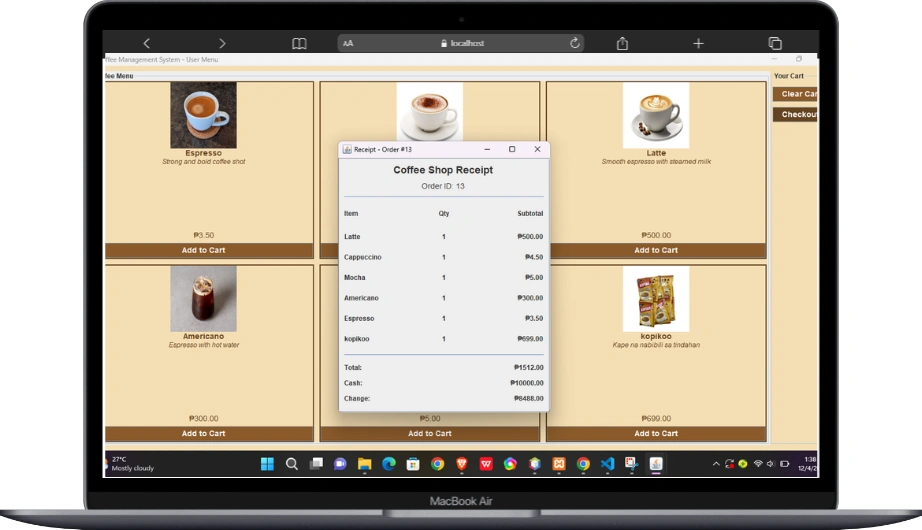
Building real projects is where learning actually starts to make sense. Tutorials can teach syntax, but they rarely show how an actual system behaves when different users, data, and workflows come together. That’s why this Coffee Management System using Java and MySQL was created. It’s designed to help students experience how a real application works from login to daily operations, not just how individual features are coded.
One of the key ideas behind this project is understanding role-based access. The system has two separate logins: one for the admin and one for the cashier. This setup reflects real-world business systems where different users have different responsibilities. Learning how to separate logic, permissions, and workflows based on roles is an important skill for any developer, and this project gives you a practical introduction to that concept.
On the cashier side, the focus is on day-to-day operations. The cashier can view the coffee menu with complete details such as the product name, description, image, and price. From there, they can operate the ordering process and generate a receipt for the customer. This part of the system helps you understand how data is retrieved from the database, displayed to the user, processed during transactions, and finally recorded as sales. Even something as simple as printing a receipt teaches valuable lessons about data flow and system state.
On the admin side, the system shifts to management and control. Admin users have access to inventory management, user management, and sales monitoring. This is where you see how backend logic supports business decisions. Inventory teaches you how stock levels are tracked and updated, user management introduces basic account handling, and sales data shows how transactions are summarized and stored for reporting. These are core features found in almost every management system, regardless of industry.
It’s also important to point out that the design is intentionally kept simple and not fully polished. This is not a flaw it’s part of the learning process. The goal is for you to improve it. You’re encouraged to enhance the layout, improve usability, and even redesign the interface entirely. Think of this project as a working foundation that you can evolve into something more refined.
All setup and configuration instructions are included inside the downloaded file, and taking time to read them will save you from unnecessary confusion later. As you explore the source code, a good approach is to follow one feature at a time. Trace how login works, then move on to how menu items are displayed, and finally how transactions are saved. Understanding one complete flow is far more effective than skimming everything at once.
A helpful trick is to experiment with small changes. Modify queries, add validations, improve error handling, or refactor methods that feel too long or repetitive. These small improvements will sharpen your problem-solving skills and give you confidence working with real codebases.
This project is not meant to be perfect. It’s meant to be educational. If you can understand how the admin and cashier roles work, how Java communicates with MySQL, and how data moves through the system, you’re already building the mindset of a backend developer.
Use this project as a starting point. Improve it, expand it, and make it your own. That’s where real learning happens.
Happy coding and keep building.
No responses yet