


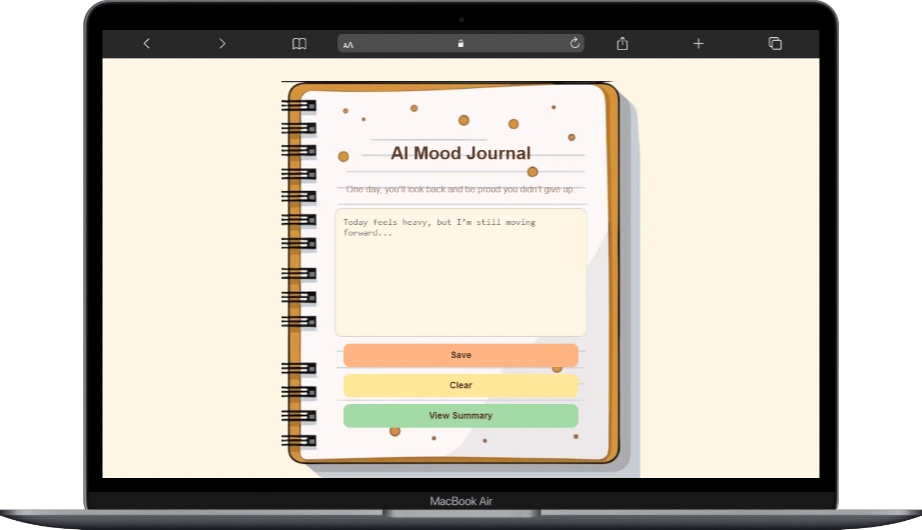
Heya! Thanks for taking an interest in learning how to build an AI Mood Detector using HTML, CSS, and JavaScript. To accelerate your learning in these technologies, I made sure to put extra care into this project so you won’t rely solely on AI code generators.
Let’s be real it’s frustrating when AI doesn’t give the exact code you want, right? That’s why having strong fundamentals, or mastering these three core technologies, gives you a big advantage. You can customize and debug everything 100x faster compared to starting from scratch every time.
If you haven’t enrolled yet in mastering the basic fundamentals, I encourage you to enroll and get hands-on practice with a real mentor by clicking this:
Alright! Let’s dive in to the project. It’s composed of the three technology. You can copy the code here or just download the whole file.
index.html
 <div class="container">
        <h1>AI Mood Journal</h1>
        <p class="subtitle">One day, you’ll look back and be proud you didn’t give up.</p>

        <textarea id="moodInput" placeholder="Today feels heavy, but I’m still moving forward..."></textarea>

        <button id="saveBtn">Save</button>
        <button id="clearBtn">Clear</button>
        <button id="openSummaryBtn">View Summary</button>
    </div>

    <div id="notify" class="notify"></div>


    <!-- Popup Modal -->
    <div id="summaryModal" class="modal">
        <div class="modal-content">
            <span id="closeModal" class="close-btn">×</span>
            <h2>Mood Summary</h2>
            <ul id="historyList"></ul>
        </div>
    </div>


    <script src="script.js"></script>
This HTML code creates the main structure of the AI Mood Journal app. It defines what users see on the screen and where they interact.
Main Container
<div class="container">
This wraps the entire app content. It helps center and style everything using CSS.
Title and Subtitle
<h1>AI Mood Journal</h1>
<p class="subtitle">One day, you’ll look back and be proud you didn’t give up.</p>
- The
<h1>displays the main title of the app. - The
<p>tag shows a motivational message below the title.
Mood Input Area
<textarea id="moodInput" placeholder="Today feels heavy, but I’m still moving forward..."></textarea>
This is where the user types their feelings or mood for the day.
The id="moodInput" allows JavaScript to read what the user types.
Action Buttons
<button id="saveBtn">Save</button>
<button id="clearBtn">Clear</button>
<button id="openSummaryBtn">View Summary</button>
- Save stores the mood entry
- Clear removes the text inside the textarea
- View Summary opens a popup showing previous entries
Each button has an id so JavaScript can add actions to them.
Notification Area
<div id="notify" class="notify"></div>
This empty div is used to display messages like “Mood saved successfully” or warnings.
JavaScript updates this dynamically.
Summary Popup (Modal)
<div id="summaryModal" class="modal">
This creates a popup window (modal) that stays hidden until the user clicks View Summary.
Inside the modal:
<span id="closeModal" class="close-btn">×</span>
This is the close button for the popup.
<ul id="historyList"></ul>
This list will display saved mood entries using JavaScript.
JavaScript File
<script src="script.js"></script>
This connects your HTML to JavaScript.
All logic like saving moods, clearing input, opening the modal, and showing history happens inside script.js.
script.js
// Simple keyword AI
function analyzeMood(text) {
    text = text.toLowerCase();

    const sadWords = ["sad", "lungkot", "down", "iyak", "pagod", "stress", "heavy", "heavier"];
    const happyWords = ["happy", "saya", "good", "okay", "masaya", "excited"];

    let sadCount = sadWords.filter(w => text.includes(w)).length;
    let happyCount = happyWords.filter(w => text.includes(w)).length;

    if (sadCount > happyCount) return "Stressed";
    if (happyCount > sadCount) return "Happy";

    return "Neutral";
}

// Get elements
const saveBtn = document.getElementById("saveBtn");
const clearBtn = document.getElementById("clearBtn");
const list = document.getElementById("historyList");
const input = document.getElementById("moodInput");

// load saved entries
let history = JSON.parse(localStorage.getItem("moodHistory") || "[]");

// show history
function renderHistory() {
    list.innerHTML = "";
    history.forEach(entry => {
        const li = document.createElement("li");
        li.innerHTML = `
        <div class="entry-date">${entry.date}</div>
        <div class="entry-text">${entry.text}</div>
        <span class="mood-tag ${entry.mood.toLowerCase()}">${entry.mood}</span>
    `;

        list.appendChild(li);
    });
}

//save button
saveBtn.onclick = () => {
    const text = input.value.trim();
    if (!text) return;

    const mood = analyzeMood(text);

    history.unshift({ date: new Date().toLocaleString(), text, mood });
    localStorage.setItem("moodHistory", JSON.stringify(history));

    renderHistory();
    input.value = "";

    notify("Saved successfully!");
};

//clear
clearBtn.onclick = () => {
    input.value = "";
    history = [];
    localStorage.setItem("moodHistory", JSON.stringify(history));
    renderHistory();

    notify("History cleared!");
};


renderHistory();


function notify(msg) {
    const box = document.getElementById("notify");
    box.textContent = msg;
    box.style.display = "block";
    box.style.opacity = "1";

    setTimeout(() => {
        box.style.opacity = "0";
        setTimeout(() => box.style.display = "none", 300);
    }, 1500);
}


// modal
const modal = document.getElementById("summaryModal");
const openBtn = document.getElementById("openSummaryBtn");
const closeBtn = document.getElementById("closeModal");

openBtn.onclick = () => modal.style.display = "flex";
closeBtn.onclick = () => modal.style.display = "none";

window.onclick = (e) => {
    if (e.target === modal) modal.style.display = "none";
};
styles.css
/* Notebook-style UI */
body {
    font-family: "Poppins", sans-serif;
    background: #FFF6E5; /* warm cream background */
    margin: 0;
    padding: 0;
    display: flex;
    justify-content: center;
    min-height: 100vh;
    color: #5B3A29; /* dark brown text */
}

.container {
    width: 90%;
    max-width: 600px;
    padding: 80px 20px; /* reduced padding for smaller screens */
    margin-top: 40px;
    background-image: url("./img/notebook-bg.png");
    background-repeat: no-repeat;
    background-size: cover;
    background-position: top center;
    display: flex;
    justify-content: center;
    align-items: center;
    flex-direction: column;
}

h1 {
    text-align: center;
    font-size: 2rem; /* relative unit */
    font-weight: 700;
    color: #5B3A29;
}

.subtitle {
    text-align: center;
    color: #A58C7C;
    margin-bottom: 1.5rem;
}

textarea {
    width: 70%;
    height: 200px;
    border-radius: 12px;
    border: 1px solid #D7CFC3;
    padding: 14px;
    font-size: 1rem;
    resize: none;
    background: #FFF6E5;
    box-shadow: inset 0 0 8px rgba(0, 0, 0, 0.03);
    color: #5B3A29;
}

button {
    width: 70%;
    padding: 12px;
    margin-top: 12px;
    border: none;
    border-radius: 12px;
    font-size: 1rem;
    cursor: pointer;
    font-weight: 600;
    transition: 0.2s;
}

#saveBtn { background: #FFB482; color: #5B3A29; }
#saveBtn:hover { background: #FFA66A; }

#clearBtn { background: #FFE699; color: #5B3A29; }
#clearBtn:hover { background: #FFEB7D; }

#openSummaryBtn { background: #A3D9A5; color: #5B3A29; }
#openSummaryBtn:hover { background: #8CCF8C; }

/* History */
#historyList {
    list-style: none;
    padding: 0;
    margin: 0;
    font-family: "Poppins", sans-serif;
}

#historyList li {
    margin-bottom: 14px;
    padding: 14px 18px;
    border-radius: 12px;
    background: #fafafa;
    border: 1px solid #e5e5e5;
    color: #3b3b3b;
    font-size: 14px;
    line-height: 1.5;
    box-shadow: 0 2px 6px rgba(0,0,0,0.05);
}

#historyList li b {
    font-size: 15px;
    color: #111;
}


.mood-tag {
    display: inline-block;
    margin-top: 6px;
    padding: 4px 10px;
    border-radius: 6px;
    font-size: 12px;
    font-weight: 600;
}

/* Colors per mood */
.mood-tag.happy {
    background: #d4f7d4;
    color: #1a7a1a;
}

.mood-tag.stressed {
    background: #ffe1e1;
    color: #b92c2c;
}

.mood-tag.neutral {
    background: #f0f0f0;
    color: #555;
}

/* Popup modal */
.modal {
    display: none;
    position: fixed;
    inset: 0;
    background: rgba(0, 0, 0, 0.4);
    backdrop-filter: blur(3px);
    justify-content: center;
    align-items: center;
}

.modal-content {
    background: #F5E4C3;
    padding: 25px;
    width: 85%;
    max-width: 500px;
    border-radius: 20px;
    box-shadow: 0 8px 20px rgba(0, 0, 0, 0.15);
    border: 1px solid #E0C9A0;
    color: #5B3A29;
}

.close-btn {
    float: right;
    font-size: 1.5rem;
    cursor: pointer;
}

.notify {
    position: fixed;
    bottom: 20px;
    right: 20px;
    background: #333;
    color: white;
    padding: 12px 18px;
    border-radius: 10px;
    display: none;
    font-size: 14px;
    opacity: 0;
    transition: 0.3s;
    z-index: 9999;
}

/* Responsive adjustments */
@media (max-width: 600px) {
    .container {
        padding: 60px 5px;
    }
    h1 {
        font-size: 1.8rem;
    }
    .subtitle {
        font-size: 1rem;
        margin-bottom: 1rem;
    }
    textarea {
        height: 120px;
        width: 90%;
        font-size: 0.9rem;
    }
    button {
        font-size: 0.95rem;
        padding: 10px;
        width: 90%;
    }
    .modal-content {
        padding: 20px;
        width: 90%;
    }
}
No responses yet