


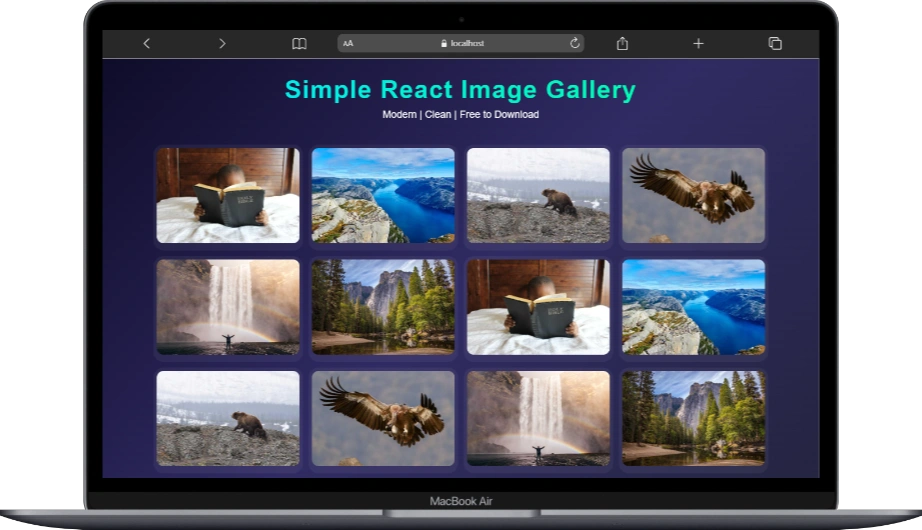
At some point in your React journey, you’ll build an image gallery. Not because it’s exciting, but because someone will ask for it and expect it to “just work.”
I’ve built galleries that tried to do too much. Sliders, carousels, lazy loading, third-party libraries I had to Google again six months later. This one is not that.
This one is intentionally simple.
The goal here wasn’t to impress anyone. The goal was to build something clean, readable, and easy to explain to your future self.
The idea is straightforward: show a grid of images, click one, see it bigger, click again to close it. No surprises. No drama.
import { useState } from "react";
import "./Gallery.css";

function App() {
  const images = [
    "https://picsum.photos/id/1010/600/400",
    "https://picsum.photos/id/1015/600/400",
    "https://picsum.photos/id/1020/600/400",
    "https://picsum.photos/id/1024/600/400",
    "https://picsum.photos/id/1035/600/400",
    "https://picsum.photos/id/1043/600/400",
    "https://picsum.photos/id/1010/600/400",
    "https://picsum.photos/id/1015/600/400",
    "https://picsum.photos/id/1020/600/400",
    "https://picsum.photos/id/1024/600/400",
    "https://picsum.photos/id/1035/600/400",
    "https://picsum.photos/id/1043/600/400",
  ];

  const [selectedImg, setSelectedImg] = useState(null);

  return (
    <div className="container">
      <header>
        <h1 className="title">Simple React Image Gallery</h1>
        <p className="subtitle">Modern | Clean | Free to Download </p>
      </header>

      <div className="gallery">
        {images.map((img, index) => (
          <div className="img-card" key={index}>
            <img src={img} onClick={() => setSelectedImg(img)} alt="Gallery" />
          </div>
        ))}
      </div>

      {selectedImg && (
        <div className="preview" onClick={() => setSelectedImg(null)}>
          <img src={selectedImg} className="zoom-in" />
        </div>
      )}

      <footer>
        <p>Created by <a href="https://fromzerotohero.dev" target="_blank">From Zero To Hero</a> </p>
      </footer>
    </div>
  );
}

export default App;
The images themselves are just static URLs. And that’s fine. When you’re focusing on interaction and structure, hardcoded data is a feature, not a flaw. It lets you think clearly without dragging APIs into the conversation too early.
There’s only one piece of state in this entire app, and that’s a deliberate choice. It answers a single question: is there an image selected right now? If yes, we store the image. If not, we store nothing. That’s it.
When you click an image, we update the state. React re-renders. The preview appears. When you click the preview, we reset the state and everything disappears again. No toggles stacked on toggles. No flags pretending to be logic.
The gallery itself is just a simple map over the image array. Each image knows exactly one thing: what to do when it’s clicked. That small decision keeps everything predictable and boring in the best way possible.
The preview isn’t a real modal. It doesn’t need to be. It’s just conditional rendering doing its job. If there’s a selected image, we render it. If there isn’t, we don’t. This is one of those moments where React feels almost unfairly good at what it does.
What I like about this approach is how well it ages. You can add animations later. You can load images dynamically. You can reuse this pattern in other projects without rewriting the logic. The foundation stays solid because it was never complicated to begin with.
This gallery isn’t really about images. It’s about restraint. It’s about resisting the urge to overbuild. It’s about trusting simple state and letting the UI reflect it naturally.
After years of building things that were harder than they needed to be, I’ve learned this: simple code is usually the code that survives. And if someone asks you to “just add a gallery” again in the future, you’ll know exactly how to do it without installing half the internet.
That’s a quiet win and those are the ones that matter most.
To run the app just follow the instruction inside the downloaded file. Thanks!
No responses yet