


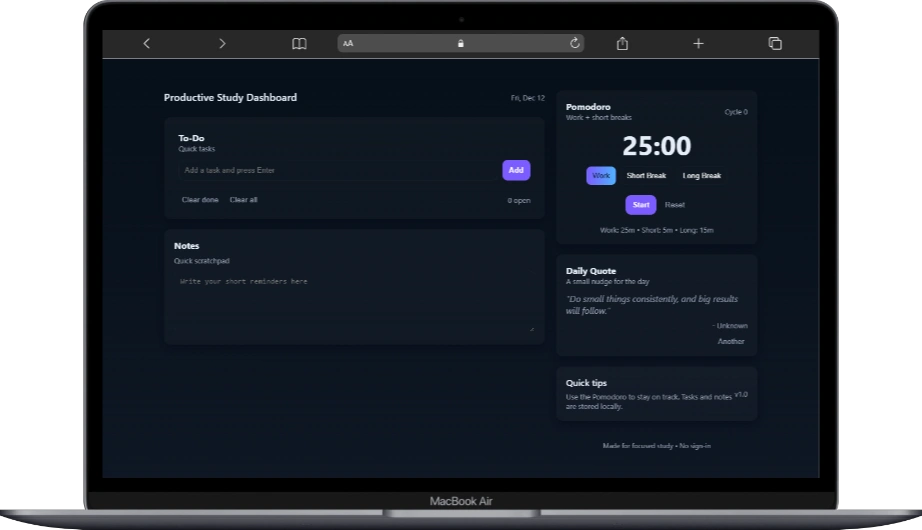
Do you hate studying because you have ADHD? I have ADHD too and I swear, it really sucks. Every time I try to study in “serious mode,” I suddenly grab my phone, open Facebook, and start scrolling.
But here’s the good news: I found a solution.
Programming can actually help manage ADHD, especially when combined with the Pomodoro Technique. That’s why I created a study dashboard that I can personally use without installing anything or relying on online tools.
The dashboard uses a simple Pomodoro setup: 25 minutes of focused work, 5 minutes for a short break, and 15 minutes for a long break. I use it every time I work even while writing this blog, I’m currently in a 25-minute work session. After that, I usually take a 10-15 minute break.
During breaks, I follow Dr. Justin Sung’s advice: I grab a piece of paper and scribble anything to clear my thoughts for a moment. It’s surprisingly effective-it boosts creativity and improves focus.
Anyway, enough chitchat. Here’s the code you can play with, download, or modify however you want.
index.html
<!doctype html>
<html lang="en">
<head>
  <meta charset="utf-8" />
  <meta name="viewport" content="width=device-width,initial-scale=1" />
  <title>Pomodoro Study With Me</title>
  <link rel="stylesheet" href="style.css">
</head>
<body>
  <div class="wrap">
    <div class="pane">
      <header>
        <div>
          <h1>Productive Study Dashboard</h1>
        </div>
        <div class="sub" id="dateDisplay"></div>
      </header>

      <section class="card big" aria-labelledby="todos">
        <div class="todo-head">
          <div style="display:flex;flex-direction:column">
            <strong id="todos">To-Do</strong>
            <span class="sub">Quick tasks </span>
          </div>
        </div>

        <div class="todo-input" style="margin-top:12px">
          <input type="text" id="todoInput" placeholder="Add a task and press Enter" />
          <button class="primary" id="addTodo">Add</button>
        </div>

        <ul class="todo-list" id="todoList" style="margin-top:14px"></ul>

        <div style="display:flex;gap:8px;margin-top:12px;align-items:center">
          <button class="small-btn" id="clearDone">Clear done</button>
          <button class="small-btn" id="clearAll">Clear all</button>
          <div style="flex:1"></div>
          <div class="sub" id="todoCount"></div>
        </div>
      </section>

      <section class="card" id="notesCard">
        <strong>Notes</strong>
        <div class="sub" style="margin-top:8px">Quick scratchpad</div>
        <textarea id="notes" placeholder="Write your short reminders here" style="width:100%;min-height:110px;margin-top:10px;border-radius:10px;padding:10px;border:1px solid rgba(255,255,255,0.03);background:transparent;color:inherit"></textarea>
      </section>

    </div>

    <aside class="right">
      <section class="card timer">
        <div style="display:flex;justify-content:space-between;width:100%;align-items:center">
          <div>
            <strong>Pomodoro</strong>
            <div class="sub">Work + short breaks</div>
          </div>
          <div class="sub" id="cycleDisplay">Cycle 0</div>
        </div>

        <div class="time" id="timeDisplay">25:00</div>

        <div class="modes" role="tablist" aria-label="timer modes">
          <button class="mode active" data-mode="work">Work</button>
          <button class="mode" data-mode="short">Short Break</button>
          <button class="mode" data-mode="long">Long Break</button>
        </div>

        <div class="timer-controls" style="margin-top:10px">
          <button class="primary" id="startPause">Start</button>
          <button class="small-btn" id="resetBtn">Reset</button>
        </div>

        <div class="sub" style="margin-top:10px">Work: <span id="workMins">25</span>m • Short: <span id="shortMins">5</span>m • Long: <span id="longMins">15</span>m</div>
      </section>

      <section class="card">
        <strong>Daily Quote</strong>
        <div class="sub">A small nudge for the day</div>
        <div style="margin-top:12px">
          <blockquote id="quoteText">"Loading..."</blockquote>
          <div class="quote-by" id="quoteBy"></div>
        </div>

        <div style="display:flex;gap:8px;margin-top:12px;justify-content:flex-end">
          <button class="small-btn" id="newQuote">Another</button>
        </div>
      </section>

      <div class="card small" style="display:flex;justify-content:space-between;align-items:center">
        <div>
          <div style="font-weight:600">Quick tips</div>
          <div class="sub" style="font-size:13px;margin-top:6px">Use the Pomodoro to stay on track. Tasks and notes are stored locally.</div>
        </div>
        <div style="text-align:right" class="sub">v1.0</div>
      </div>

      <footer class="small">Made for focused study • No sign-in</footer>
    </aside>
  </div>

  <script id="quotes" type="application/json">
    [
      {"text":"Do small things consistently, and big results will follow.","by":"Unknown"},
      {"text":"Focus on progress, not perfection.","by":"Unknown"},
      {"text":"You don’t have to be great to start, but you have to start to be great.","by":"Zig Ziglar"},
      {"text":"Take breaks; they’re part of the process, not the opposite of it.","by":"Unknown"},
      {"text":"One hour of deep work is worth several hours of distracted work.","by":"Cal Newport"},
      {"text":"Study with the end in mind — what would you like to explain later?", "by":"You"}
    ]
  </script>

  <script src="script.js"></script>
</body>
</html>
This HTML file is the main structure of a Pomodoro Study Dashboard. It creates a simple, distraction-free layout where you can manage tasks, take notes, and use a Pomodoro timer to stay focused while studying.
The <head> section sets up the page title, mobile responsiveness, and links the external CSS file for styling.
Inside the <body>, the layout is divided into two parts:
- Left side: a To-Do list and Notes section where users can add tasks and write quick reminders.
- Right side: a Pomodoro timer with Work, Short Break, and Long Break modes, plus a daily motivational quote.
The timer, to-do list, notes, and quotes all work using JavaScript (script.js). Quotes are stored in a small JSON block inside the HTML. Everything runs locally in the browser—no login or installation required.
This project is perfect for beginners to understand how HTML structure, CSS styling, and JavaScript behavior work together.
script.js
// Simple helper utilities
const qs = s => document.querySelector(s);
const qsa = s => Array.from(document.querySelectorAll(s));
// --- Date display ---
const dateDisplay = qs('#dateDisplay');
const now = new Date();
dateDisplay.textContent = now.toLocaleDateString(undefined,{weekday:'short',month:'short',day:'numeric'});
// --- Quotes ---
const quotes = JSON.parse(document.getElementById('quotes').textContent);
const quoteText = qs('#quoteText');
const quoteBy = qs('#quoteBy');
const newQuoteBtn = qs('#newQuote');
function pickQuote(seed){
// deterministic daily quote unless user requests another
if(!seed) {
const d = new Date();
seed = d.getFullYear()*10000 + (d.getMonth()+1)*100 + d.getDate();
}
const idx = Math.abs(seed) % quotes.length;
const q = quotes[idx];
quoteText.textContent = '"' + q.text + '"';
quoteBy.textContent = q.by ? '- ' + q.by : '';
}
pickQuote();
newQuoteBtn.addEventListener('click', ()=>{
const r = Math.floor(Math.random()*100000);
pickQuote(r);
});
// --- LocalStorage helpers ---
const storage = {
get(key, fallback){const v = localStorage.getItem(key); return v ? JSON.parse(v) : fallback},
set(key, value){localStorage.setItem(key, JSON.stringify(value))}
}
// --- To-do ---
const todoInput = qs('#todoInput');
const addTodoBtn = qs('#addTodo');
const todoList = qs('#todoList');
const todoCount = qs('#todoCount');
let todos = storage.get('sd_todos', []);
function renderTodos(){
todoList.innerHTML = '';
todos.forEach((t, i)=>{
const li = document.createElement('li'); li.className='todo';
li.innerHTML = `
<input type="checkbox" ${t.done? 'checked': ''} data-i="${i}" />
<div class="text ${t.done? 'completed':''}">${escapeHtml(t.text)}</div>
<div style="display:flex;gap:8px">
<button class="small-btn" data-action="edit" data-i="${i}">✎</button>
<button class="small-btn" data-action="del" data-i="${i}">✕</button>
</div>`;
todoList.appendChild(li);
});
todoCount.textContent = todos.filter(t=>!t.done).length + ' open';
}
function escapeHtml(s){return (s+'').replace(/[&<>"']/g, c=>({ '&':'&','<':'<','>':'>','"':'"',"'":'''}[c]))}
function addTodo(text){
if(!text || !text.trim()) return;
todos.unshift({text: text.trim(), done:false, id:Date.now()});
storage.set('sd_todos', todos);
todoInput.value='';
renderTodos();
}
addTodoBtn.addEventListener('click', ()=>addTodo(todoInput.value));
todoInput.addEventListener('keydown', e=>{ if(e.key==='Enter') addTodo(todoInput.value) });
todoList.addEventListener('click', e=>{
const target = e.target;
if(target.tagName === 'INPUT' && target.type === 'checkbox'){
const i = Number(target.dataset.i); todos[i].done = target.checked; storage.set('sd_todos', todos); renderTodos();
}
if(target.dataset.action === 'del'){
const i = Number(target.dataset.i); todos.splice(i,1); storage.set('sd_todos', todos); renderTodos();
}
if(target.dataset.action === 'edit'){
const i = Number(target.dataset.i);
const newText = prompt('Edit task', todos[i].text);
if(newText !== null){ todos[i].text = newText.trim(); storage.set('sd_todos', todos); renderTodos(); }
}
});
qs('#clearDone').addEventListener('click', ()=>{ todos = todos.filter(t=>!t.done); storage.set('sd_todos', todos); renderTodos(); });
qs('#clearAll').addEventListener('click', ()=>{ if(confirm('Clear all tasks?')){ todos = []; storage.set('sd_todos', todos); renderTodos(); } });
renderTodos();
// --- Notes ---
const notes = qs('#notes');
notes.value = storage.get('sd_notes', '');
notes.addEventListener('input', ()=> storage.set('sd_notes', notes.value));
// --- Pomodoro timer ---
const timeDisplay = qs('#timeDisplay');
const modes = qsa('.mode');
const startPause = qs('#startPause');
const resetBtn = qs('#resetBtn');
const cycleDisplay = qs('#cycleDisplay');
const workMinsEl = qs('#workMins');
const shortMinsEl = qs('#shortMins');
const longMinsEl = qs('#longMins');
let settings = storage.get('sd_timer_settings', {work:25, short:5, long:15, longAfter:4});
workMinsEl.textContent = settings.work; shortMinsEl.textContent = settings.short; longMinsEl.textContent = settings.long;
let timer = storage.get('sd_timer', {mode:'work', remaining: settings.work*60, running:false, cycles:0});
function saveTimer(){ storage.set('sd_timer', timer); }
function formatTime(s){ const m = Math.floor(s/60); const ss = s%60; return String(m).padStart(2,'0')+':'+String(ss).padStart(2,'0') }
function setMode(m){ timer.mode = m; if(m==='work') timer.remaining = settings.work*60; if(m==='short') timer.remaining = settings.short*60; if(m==='long') timer.remaining = settings.long*60; updateModeUI(); saveTimer(); }
function updateModeUI(){ qsa('.mode').forEach(b=> b.classList.toggle('active', b.dataset.mode===timer.mode)); timeDisplay.textContent = formatTime(timer.remaining); cycleDisplay.textContent = 'Cycle ' + timer.cycles; }
updateModeUI();
// timer tick
let tickInterval = null;
function playBeep(){ try{ const ac = new (window.AudioContext||window.webkitAudioContext)(); const o = ac.createOscillator(); const g = ac.createGain(); o.type='sine'; o.frequency.value=880; g.gain.value=0.05; o.connect(g); g.connect(ac.destination); o.start(); setTimeout(()=>{o.stop(); ac.close()},250); }catch(e){}
}
function onTimerEnd(){ playBeep(); if(timer.mode==='work'){ timer.cycles += 1; // choose break
if(timer.cycles % settings.longAfter === 0) setMode('long'); else setMode('short');
} else {
setMode('work');
}
saveTimer(); updateModeUI();
}
function startTimer(){ if(timer.running) return; timer.running = true; saveTimer(); startPause.textContent='Pause';
tickInterval = setInterval(()=>{
if(timer.remaining > 0){ timer.remaining -= 1; timeDisplay.textContent = formatTime(timer.remaining); }
else { clearInterval(tickInterval); timer.running=false; onTimerEnd(); startPause.textContent='Start'; }
},1000);
}
function pauseTimer(){ if(!timer.running) return; timer.running=false; clearInterval(tickInterval); startPause.textContent='Start'; saveTimer(); }
function resetTimer(){ pauseTimer(); setMode('work'); timer.cycles = 0; saveTimer(); updateModeUI(); }
startPause.addEventListener('click', ()=>{ if(timer.running) pauseTimer(); else startTimer(); });
resetBtn.addEventListener('click', ()=>{ if(confirm('Reset timer and cycles?')) resetTimer(); });
modes.forEach(b=> b.addEventListener('click', ()=>{ setMode(b.dataset.mode); pauseTimer(); updateModeUI(); }));
// if previously running, don't auto-start but show remaining
updateModeUI();
// --- On unload save timer state ---
window.addEventListener('beforeunload', ()=>{ saveTimer(); });
// expose simple public API for quick tweaks in console
window.StudyDashboard = { todos, timer, settings };
This JavaScript file powers the interactive features of the Study Dashboard. It handles the to-do list, notes, Pomodoro timer, daily quotes, and saves everything using localStorage, so your data stays even after refreshing the page.
First, simple helper functions make selecting HTML elements easier. The script then displays the current date and loads motivational quotes stored in JSON. One quote is shown per day, with an option to generate a new one.
The to-do system lets users add, edit, complete, and delete tasks. All tasks are saved locally so nothing is lost on reload. The notes section works the same way—text is automatically saved while typing.
The Pomodoro timer controls work and break sessions (25-5-15). It tracks cycles, switches modes automatically, plays a sound when time is up, and remembers its state even if the page is closed.
Overall, this script shows how JavaScript connects logic, user interaction, and browser storage to build a practical real-world app.
styles.css
    :root{
      --bg:#0f1724;
      --card:#0b1220;
      --muted:#98a0b3;
      --accent:#7c5cff;
      --glass: rgba(255,255,255,0.03);
      --radius:12px;
      font-family: Inter, ui-sans-serif, system-ui, -apple-system, "Segoe UI", Roboto, "Helvetica Neue", Arial;
      color-scheme: dark;
    }
    *{
      box-sizing:border-box;
    }

    html,body{
      height:100%;
      margin:0;
      background:linear-gradient(180deg,#07101a 0%,var(--bg) 100%);
      color:#e6eef8;
    }

    .wrap{
      max-width:1100px;
      margin:36px auto;
      padding:20px;
      display:grid;
      grid-template-columns:1fr 360px;
      gap:20px;
    }

    header{
      display:flex;
      align-items:center;
      justify-content:space-between;
      margin-bottom:6px;
    }

    h1{
      font-size:18px;
      margin:0;
      font-weight:600;
      letter-spacing:0.2px;
    }

    .sub{
      color:var(--muted);
      font-size:13px;
    }

    .card{
      background:linear-gradient(180deg, rgba(255,255,255,0.03), rgba(255,255,255,0.02));
      padding:18px;
      border-radius:var(--radius);
      box-shadow:0 6px 18px rgba(2,6,23,0.6);
    }

    .big{
      padding:26px;
    }

    /* left column */
    .pane{
      display:flex;
      flex-direction:column;
      gap:18px;
    }

    /* todo */
    .todo-head{
      display:flex;
      gap:10px;
      align-items:center;
    }

    .todo-input{
      display:flex;
      gap:8px;
    }

    input[type=text]{
      background:transparent;
      border:1px solid rgba(255,255,255,0.04);
      padding:10px;
      border-radius:10px;
      color:inherit;
      outline:none;
      flex:1;
    }

    button.primary{
      background:var(--accent);
      border:none;
      color:white;
      padding:10px 12px;
      border-radius:10px;
      cursor:pointer;
      font-weight:600;
    }

    ul.todo-list{
      list-style:none;
      padding:0;
      margin:0;
      display:flex;
      flex-direction:column;
      gap:8px;
    }

    li.todo{
      display:flex;
      align-items:center;
      gap:12px;
      padding:10px;
      border-radius:10px;
      background:var(--glass);
    }

    .todo .text{
      flex:1;
    }

    .todo .text.completed{
      opacity:0.5;
      text-decoration:line-through;
    }

    .small-btn{
      background:transparent;
      border:none;
      color:var(--muted);
      cursor:pointer;
    }

    /* right column */
    .right{
      display:flex;
      flex-direction:
      column;
      gap:18px;
    }

    /* pomodoro */
    .timer{display:flex;flex-direction:column;align-items:center;gap:8px}
    .time{font-size:48px;font-weight:700}
    .modes{display:flex;gap:8px}
    .mode{padding:8px 10px;border-radius:9px;background:transparent;border:1px solid rgba(255,255,255,0.03);cursor:pointer}
    .mode.active{background:linear-gradient(90deg,var(--accent),#4fb3ff);color:#041427}
    .timer-controls{display:flex;gap:10px}

    /* quote */
    blockquote{margin:0;font-style:italic;color:var(--muted)}
    .quote-by{margin-top:8px;font-size:13px;color:var(--muted);text-align:right}

    footer.small{font-size:12px;color:var(--muted);text-align:center;margin-top:18px}

    /* responsive */
    @media (max-width:900px){.wrap{grid-template-columns:1fr;max-width:760px}.right{order:2}}
This CSS controls the layout, colors, and overall visual structure of the study dashboard using CSS variables, Flexbox, Grid, and responsive design. It keeps the interface clean, reusable, and adaptable across devices.
If you want to master CSS properly from core fundamentals to advanced layouts guided learning makes a real difference. Enroll now and build the skills needed to design confident, production-ready interfaces.
No responses yet